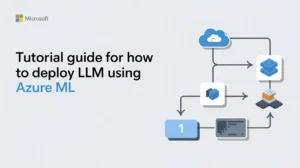
Large Language Models (LLMs) are disrupting the way organizations are developing intelligent applications, be it chatbots and copilots, document analysis, or code generation tools.. Microsoft Azure Machine Learning (Azure ML) offers a robust, enterprise-grade service to deploy, manage, and scale LLMs securely and efficiently. In this tutorial guide, we will deep dive step by step on LLMs deployment using Azure ML, starting from concepts, architecture, deployment methods to best practices, all with great references. This guide describes how to take machine learning models to production, from experimentation to production on Azure, regardless of whether you are a data scientist, ML engineer, or developer.
⚡ Quick Facts: Azure ML for LLM Deployment
- Service Type: Enterprise-grade cloud ML platform
- Deployment Methods: 4+ options (Managed Endpoints, Batch, AKS, OpenAI)
- Supported Models: GPT-4, LLaMA, Mistral, Falcon, Custom models
- Key Features: Auto-scaling, MLOps, Monitoring, Security
- Integration: Azure OpenAI, Hugging Face, Docker
- Best For: Secure, governed, scalable LLM deployments
What Is Azure Machine Learning?
Azure Machine Learning is the cloud service which you can use to build, train, deploy and manage your machine learning models at scale. Compatible with traditional ML Models, deep learning frameworks, and even state-of-the-art foundation models (such as large language models).
Top Features of Azure ML:
- Managed compute and scalable infrastructure: Automatic resource provisioning
- Model registry and versioning: Track and manage model versions
- Secure deployment endpoints: HTTPS endpoints with authentication
- MLOps and monitoring tools: Production-grade monitoring and logging
- Integration with Azure OpenAI and Hugging Face models: Seamless model integration
Azure ML works especially well for organisations looking for secure, governed, and scalable LLM deployments.
Deploying LLMs in Azure ML
Depending upon your use case, there are several ways to deploy the LLM as a service with Azure ML:
| Deployment Method | Best For | Use Case |
|---|---|---|
| Azure OpenAI Service | Managed API-based approach | GPT-4, GPT-4o |
| Managed Online Endpoints | Low-latency inference | Custom/Open-source models |
| Batch Endpoints | Offline processing | Large-scale batch jobs |
| Deployments on AKS | Complete customization | High-throughput loads |
This tutorial targets Managed Online Endpoints which is a popular use-case for interactive LLM applications.
💡 Expert Insight
"Managed Online Endpoints strike the perfect balance between customization and ease of use. They provide enterprise-grade features like auto-scaling, traffic routing, and secure authentication while giving you full control over your model serving environment. For organizations deploying custom or fine-tuned LLMs, this is the gold standard approach."
Prerequisites
Before you deploy LLM using Azure ML, kindly ensure you have:
- An active Azure subscription: Required for all Azure services
- An Azure Machine Learning workspace: Your deployment environment
- Azure CLI installed and configured: Command-line interface for Azure
- Python 3.8 or later: Programming language for scripts
- Familiarity with machine learning and REST APIs: Basic technical knowledge
You also require permissions to create compute resources and endpoints in your Azure subscription.
Step 1: Setup Azure ML Workspace
Add or use Azure ML workspace:
- Sign in to the Azure Portal
- Search for Azure Machine Learning
- Either create a new workspace (or select an existing workspace)
- Name the subscription ID, resource group and workspace
- After creating, Go to Azure ML Studio which is the web-based interface used to manage models and deployments
Step 2: Select and Load an LLM
You can deploy:
- Open-source large language models: LLaMA, Mistral, Falcon, etc.
- Fine-tuned custom models: Your domain-specific models
- Foundational models from Azure's model catalog: Pre-configured enterprise models
For open-source models, they are usually loaded through something like Hugging Face Transformers.
Key Considerations:
| Consideration | Details |
|---|---|
| Model Size | 7B, 13B, 70B parameters - affects memory and cost |
| GPU Requirements | Type and number of GPUs needed for inference |
| Inference Latency | Response time requirements for your application |
| Memory Consumption | RAM requirements during model loading and inference |
The next step is to select a model that gives you the necessary performance you need, but at a cost appropriate for your application.
Step 3: Prepare a Model Serving Environment
It requires a runtime environment that contains all the dependencies required for inference in Azure ML. This environment usually contains:
- Python runtime: Base Python installation
- PyTorch or TensorFlow: Deep learning framework
- Transformers library: HuggingFace transformers for LLM support
- Tokenizers: Text processing libraries
- Custom inference scripts: Your deployment logic
A conda YAML file or Docker image is how you define this environment. This container will be built and managed by Azure ML itself.
Step 4: Draft the Scoring Script
The scoring script handles:
- Model loading: Initialize the LLM in memory
- Input processing: Parse and validate incoming requests
- Generating responses: Execute model inference
- Returning predictions: Format and return results
📝 Typical Scoring Script Structure
A typical script includes:
- init() – Loads the LLM at the start of the container
- run() – Accepts incoming requests and returns outputs
The script is responsible for how your deployed LLM responds to a user prompt.
Step 5: Create a Managed Online Endpoint
Managed online endpoints provide:
- HTTPS endpoints for real-time inference: Secure API access
- Autoscaling: Automatic resource adjustment based on load
- Traffic routing: Blue-green deployments and A/B testing
- Secure authentication: Key-based or Azure AD authentication
To create one:
- Define an endpoint name
- Add meta information about the service you want to configure
- Select the size of the compute (CPU or GPU)
- Attach your model and environment
Infrastructure provisioning is done automatically by Azure ML.
Step 6: Deploy the Model
After you create the endpoint, deploy your LLM as a deployment under the endpoint. During deployment, you specify:
| Configuration | Description |
|---|---|
| Instance Type | e.g., GPU-enabled VM (Standard_NC6s_v3) |
| Number of Replicas | Scale instances for high availability |
| Request Timeout | Maximum time for inference request |
| Resource Limits | CPU, memory, and GPU constraints |
Azure ML checks everything and deploys your model. Large LLMs can take a few minutes to complete this.
Step 7: Test the Endpoint
After deployment:
- Retrieve the endpoint URL
- Obtain an authentication key/token
- Test with a cURL, Postman, or Python Request
Example inputs typically include:
- Prompt text: The input query or instruction
- Temperature: Controls randomness (0.0-1.0)
- Max tokens: Maximum length of generated response
- Top-p or top-k values: Sampling parameters for generation
Testing guarantees a proper reply and performance from your LLM.
🎯 Need Help With Azure ML Deployment?
Get expert guidance on LLM deployment, environment configuration, and optimization strategies.
✅ Enterprise-Grade Solutions | ✅ Performance Optimization | ✅ Security Best Practices
Step 8: Monitor and Scale
With Azure ML, monitoring how you handle and track:
- Request latency: Time taken for each inference request
- Throughput: Number of requests processed per second
- Error rates: Failed requests and error patterns
- Resource utilization: CPU, GPU, and memory usage
You can configure:
- Autoscaling rules: Scale based on metrics like CPU or request count
- Logging and diagnostics: Application Insights integration
- Alerts for failures: Proactive notification of issues
When deploying LLMs at scale for an enterprise, keeping them reliable and ensuring cost optimization makes monitoring very important.
Best Practices for Azure ML LLM Deployment
Here are a few best practices for successful deployment:
| Best Practice | Benefit |
|---|---|
| Sample Smaller Models to Validate Workflows | Test deployment process without high costs |
| Configure Autoscaling for Traffic Spikes | Handle variable load automatically |
| Protect Endpoints Using Azure AD | Enhanced security and access control |
| Monitor Token Usage and Latency | Optimize costs and performance |
| Version Models for Safe Rollbacks | Quick recovery from issues |
| Make Efficient Use of Prompts | Lower inference costs and improve speed |
Adhering to these principles leads to better performance, more reliability, and cost savings.
Common Challenges and Solutions
| Challenge | Solution |
|---|---|
| High Latency | Use GPU instances and optimize batch sizes |
| High Cost | Decrease replicas and max tokens when traffic is low |
| Deployment Failures | Check dependencies and GPU compatibility |
| Security Concerns | Limit access using private endpoints and Azure networking |
Conclusion
Running large language models with Azure Machine Learning allows organizations to move from proof-of-concept experiments to production-ready AI applications. Azure ML is an end-to-end solution that has all the facilities required for secure deployment, scalable inference, and effective monitoring and therefore an ideal choice for enterprise-grade workloads of LLMs. Now you can prepare models, configure environments, deploy managed endpoints, and troubleshoot performance issues using this tutorial guide. Finally, gain confidence to deploy your Large Language Model applications on Azure ML, being able to scale reliably.
About This Guide
This comprehensive tutorial covers enterprise-grade LLM deployment on Azure Machine Learning, from initial setup to production monitoring and optimization.